

Overview
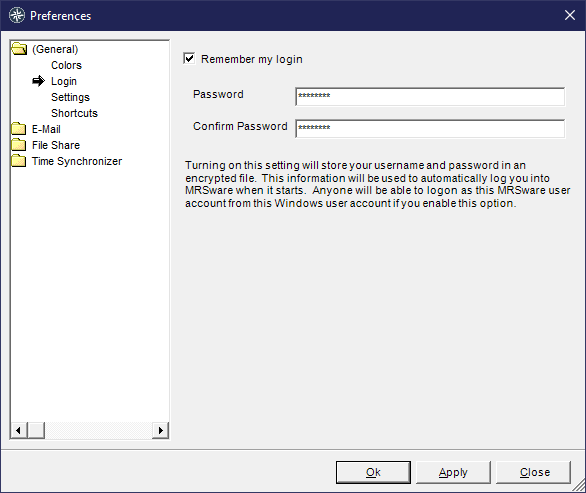
The Remember My Login feature allows MRSware to automatically log you in when the application starts. When enabled, your username and password are stored in an encrypted file on your local machine, so you don’t need to enter your credentials each time you launch MRSware.
Enabling Remember My Login
Open MRSware and go to Preferences (accessible from the main menu).
In the left-hand navigation tree, expand (General) and select Login.
Check the box labeled Remember my login.
Enter your MRSware password in the Password field.
Re-enter the same password in the Confirm Password field.
Click Apply to save your settings, or Ok to close Preferences.
Once saved, MRSware will automatically log you in as your MRSware user account the next time it starts.
Important Security Note
⚠️ Shared Computer Warning: Because credentials are tied to your Windows user account, anyone who can log into Windows as you will also be able to access MRSware automatically under your MRSware account. Do not enable this feature on shared or public computers.
Disabling Remember My Login
Open Tools > Preferences > (General) > Login.
Uncheck the Remember my login box.
Click Apply or Ok.
MRSware will return to prompting for your username and password at startup.
Frequently Asked Questions
What if I change my MRSware password? You will need to return to Preferences > Login, re-enter your new password in both the Password and Confirm Password fields, and click Apply to update the stored credentials.
Is my password stored securely? Yes. MRSware stores your credentials in an encrypted file on your local machine. Your password is never stored in plain text.
I enabled this feature but MRSware is still asking me to log in. What’s wrong? Make sure you clicked Apply (or Ok) after entering your password, and that the Password and Confirm Password fields matched exactly. Re-open Preferences to verify the checkbox is still checked. Also, since auto-login is tied to your Windows account, make sure you used the same login as before to login to the computer itself.