

When customizing your CRM to match your business workflows, one of the most common decisions is determining how to store new data points. In our CRM database structure, you have two primary mechanisms for extending contact records: Additional (Custom Fields) and Categories.
Choosing the wrong pattern can lead to database constraint violations, poor search performance, and cluttered user interfaces. This guide outlines the differences, design constraints, and best practices for when to use each.
At a Glance: Key Differences
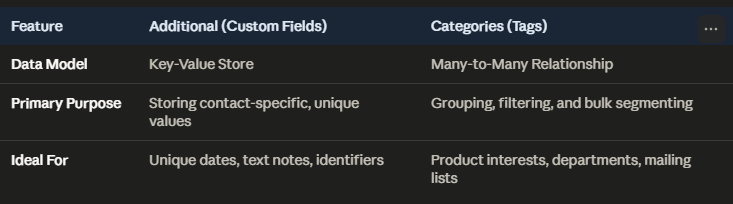
1. When to Use Custom Fields (Additional)
Custom Fields (Additional) represent a key-value store tied directly to a contact. Think of them as extensions of the contact’s primary profile.
Use Custom Fields when:
The value is unique to that specific contact: Examples include a custom callback date (Callback On), a specific date a meeting occurred (Meetdate On), or a legacy account identifier.
The value has high variance: If the field contains dates, numbers, or unique text notes that will be different for almost every contact, it belongs in Custom Fields. Creating a Category for every unique date would result in thousands of single-use categories, diluting the database’s grouping utility.
Database Constraint warning: The database enforces a unique constraint on the combination of
ContactIdand the custom fieldDescription. A contact cannot have two rows with the description'Product Type'. Trying to insert both'Welders'and'Generators'as custom fields for the same contact will result in a database error. This kind of multiple selection is better left to Categories…
2. When to Use Categories (Tags)
Categories act as tags that group multiple contacts together. They are defined globally (e.g., Dept: Purchasing, or Market: Aerospace) and linked to contacts via a many-to-many relationship.
Use Categories when:
You want to filter, segment, or report on groups of contacts: If you need to quickly pull a list of all contacts in the “Aerospace” market, or send a bulk email to everyone in the “Purchasing” department, these should be Categories.
A contact needs multiple overlapping values: Since categories are not bound by the unique constraint of the Custom Fields table, a single contact can be linked to as many categories as necessary. E.g. a customer can be in multiple markets, have multiple product types, et. al.
The values are standardized: If there is a finite, structured list of options (e.g., product lines, industry sectors, account tiers), they should be registered as categories.
Case Study: Welders & Generators
Our recent GoldMine data import highlights how these two structures work together to handle complex business rules:
The Challenge: A company like Willmington Steel Tooling or its individual representatives might work with multiple product lines, such as both Welders and Generators.
The Custom Field Constraint: Because of the unique database constraint, a contact’s profile in the Additional (Custom Fields) section can only hold one primary value for
'Product Type'(normalized to'Welders').The Category Solution: In the background, the contact is linked to both the Product Type: Welders and the Product Type: Generators categories in the many-to-many link table.
The Result: The user sees a clean, normalized value on the contact’s custom fields tab, but the contact will correctly appear in search results when filtering by either product category.
Summary Recommendation
Store it in Custom Fields (Additional) if it is an attribute belonging to the contact that you simply want to read on their profile card. Additional phone numbers, email addresses, spouse and kid names, anniversaries and other dates are all great uses here.
Store it in Categories if you ever intend to click on it to filter your database, run a report, or send a targeted group communication. Market Segments, Buying Groups, Pricing Tiers are all good examples of how Categories are great ways to find group members.